
Repair shop management software
מעבדה בקליק is management software for repair shops in Israel. It runs in the browser with nothing to install, and it has an intake form, a status board, WhatsApp messages for the customer, a personal tracking page and parts stock.
- ₪0 Free up to 30 repairs a monthA permanent plan, not a trial
- ₪99per month Up to 300 repairs a monthBasic plan
- ₪249per month Unlimited repairsPro plan
Prices include VAT. No credit card, nothing to install.
How a repair moves through the system, from intake to handover
One example from start to finish. Every stage up to handover has a customer message with fixed wording: you tap the button, your WhatsApp opens with the message ready, and you send it. The names in the example are made up.
-
Intake
To checkYou type it once: name, phone, item type, model and what is wrong. You print an intake form with a QR code and a label for the item, and the repair appears on the board under "To check".
The message the customer gets Hello Michal, your repair at Pixel Lab has been received. Intake number: 1042 (Galaxy A54). Track it: (personal link to the tracking page)
-
Price quote
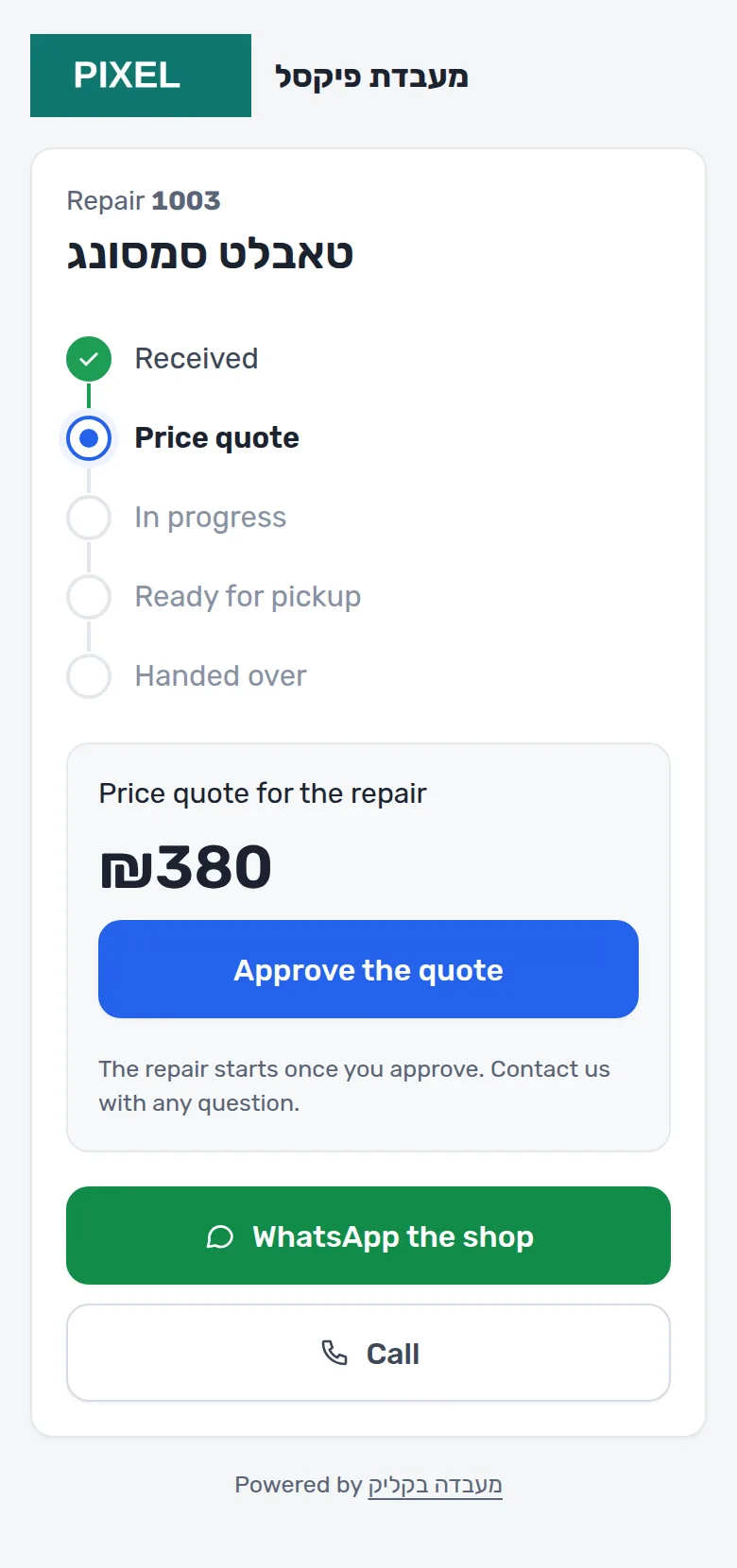
Waiting for customerAfter checking the item you enter a price and send a quote. The customer approves it with one tap on the tracking page, and the repair goes to the technician. The approval is saved in the repair history.
The message the customer gets Hello Michal, there is a price quote for your repair at Pixel Lab: ₪450 (Galaxy A54). View and approve: (personal link to the tracking page)
-
Repair
In repairThe technician sees the repair on the board. You add the parts from stock to the repair, and tag it if you are waiting for a part or need to call the customer.
The message the customer gets Hello Michal, the quote was approved and your repair at Pixel Lab is in progress (Galaxy A54). Track it: (personal link to the tracking page)
-
Ready for pickup
Ready for pickupOne button moves the repair to "Ready for pickup". The parts come off the stock. If the customer has not come after two days, a reminder button appears on the board.
The message the customer gets Hello Michal, your repair at Pixel Lab is finished and ready for pickup (Galaxy A54). Intake number: 1042.
-
Handover
Handed overYou mark the repair paid or not paid and print a handover slip. The warranty runs from the handover date, and the device lock code is deleted.
What the customer sees on the tracking page The repair is marked "Handed over", with what was done and the date the warranty ends.

What the customer sees
Every repair has a personal link, and a QR code on the intake form. The customer opens the tracking page on their phone, with no password and no app.
- Sees which stage the repair is at
- Approves a price quote with one tap
- Sees what was done and when the warranty ends
- Opens WhatsApp with the shop, or calls
The customer does not see internal notes, parts or purchase prices.
What you see every morning
The morning board gathers what needs attention: how many repairs are waiting to be checked, how many are waiting for the customer, what is ready and not collected, what has been with you over a week, who to call, what was handed over unpaid, and which part is about to run out.

Parts and stock
Stock is tied to the repairs: a part you used comes off the stock without typing it again.
- Receiving stock: several parts in one form, with quantity and unit cost
- Purchase history for every part: how many units were bought, when and at what price
- You add a part to a repair, and it comes off the stock when the repair is ready
- Stock count, and an alert on the morning board when a part reaches its minimum
- For every part: name, SKU, supplier and the supplier's SKU
A shop that does not manage stock can switch it off in the settings.

Which repair shops it fits
You choose a shop type when you sign up, and the intake form comes fitted to it: the item types and the fields of that trade. The rest of the system is the same for everyone.
- Phones and computers
- Intake form: Phone, Tablet, Laptop, Desktop, Console, Smartwatch. Extra fields: IMEI, Left with the item, Lock code.
- Power and garden tools
- Intake form: Drill or driver, Grinder, Saw, Lawn mower, Trimmer, Generator. Extra fields: Serial number, Left with the item.
- Bikes and scooters
- Intake form: Bicycle, E-bike, Scooter. Extra fields: Serial number, Left with the item.
- Home appliances
- Intake form: TV, Washing machine, Fridge, Oven, Microwave, Vacuum cleaner, Coffee machine. Extra fields: Serial number.
- Other repair shop
- Intake form: any kind of item. Extra fields: Serial number, Left with the item.
What it costs
Today every feature is included in every plan, the free one too. The only difference is the number of repairs you take in each month.
| Plan | Price per month | Repairs a month |
|---|---|---|
| Free | ₪0 | Up to 30 repairs a month |
| Basic | ₪99 | Up to 300 repairs a month |
| Pro | ₪249 | Unlimited repairs |
Every shop starts on the free plan. You ask for a paid plan from the settings and pay by transfer, 31 days at a time. Nothing is charged automatically.
Included in every plan
- Intake form fitted to the shop type
- Printing: an intake form with a QR code, a label for the item and a handover slip, with your logo and terms
- Status board, with undo for the last move
- WhatsApp messages with fixed wording for every stage up to handover, plus two more: "we tried to reach you" and a pickup reminder
- Customer tracking page with quote approval
- Paid or not paid at handover, and a list of who has not paid
- Warranty on repairs, and a returning customer's earlier repairs by phone number
- Tags: waiting for a part, call the customer
- Search by name, phone, intake number, model, IMEI or serial number
- Parts and stock
- Team: an owner and staff, each with their own login
- Hebrew, English and Russian
What the system does not have yet
So you do not find out after signing up.
- Automatic WhatsApp sending
- Today the message opens in your WhatsApp and you tap send. Automatic sending from a central number is planned for the paid plans and is not available yet.
- Invoices and receipts
- The system records what was paid and what was not. You issue the invoice or receipt in the software you already use.
- Paying for the subscription by card
- A paid plan is paid by transfer. After you ask for a plan in the settings, a payment request appears there, and the 31-day period starts once we confirm the money arrived. If you do not renew, the shop goes back to the free plan and existing repairs stay.
Frequently asked questions
How much does repair shop management software cost?
The prices of מעבדה בקליק: free, up to 30 repairs a month; ₪99 a month, up to 300 repairs a month; ₪249 a month, unlimited repairs. Prices include VAT.
Is there free software for managing a repair shop?
Yes. The free plan is permanent, not a trial: up to 30 repairs a month, with every feature and no credit card.
Are customer messages sent automatically on WhatsApp?
Not yet. Every stage up to handover has a message with fixed wording. You tap the button, your WhatsApp opens with the message ready, and you send it. The message goes out from the shop's own number, so the customer can reply straight to you.
How does the customer track the repair?
On a personal tracking page. The link is sent in the intake message, and a QR code that leads to it is printed on the intake form. On the page the customer sees the stage, approves a quote, and sees what was done and when the warranty ends.
How do I get the customer's approval for a price quote?
You send a quote from the repair card. The customer opens the tracking page, sees the price and taps approve. The repair moves to "In repair", and the approval is saved in the repair history.
Does it also fit a bike shop or a power tool repair shop?
Yes. There are templates for phones and computers, power and garden tools, bikes and scooters and home appliances, and a general template for any other repair shop. The template sets the item types and the fields of the intake form.
Do I need to install anything?
No. The system runs in the browser: on the counter computer, on a tablet in the workshop and on a phone.
Which languages can I work in?
Hebrew, English and Russian. Each shop chooses a language, and the customer messages and the tracking page are shown in that language.
What happens when I pass the monthly repair limit?
At 80% of the monthly limit a warning appears. Once the limit is full there is a grace period of 3 days in which you can keep taking in repairs, and after that only new intake is blocked. Existing repairs carry on as usual.
What happens to the device lock code?
The code is stored encrypted. Every time it is shown, that is recorded in the repair history. When the repair is handed over, the code is deleted.
Open a shop with one form
No sales call and nothing to install. You can take in your first repair today.
- ₪0 Free up to 30 repairs a monthA permanent plan, not a trial